
Register a building
Link a new or existing owner, then enter address, map pin, zone, type, and class.
Field app
The Smart Revenue Android app is how agents register buildings, deliver bills, and collect MoMo. Everything you do lands on the same records the assembly already uses.
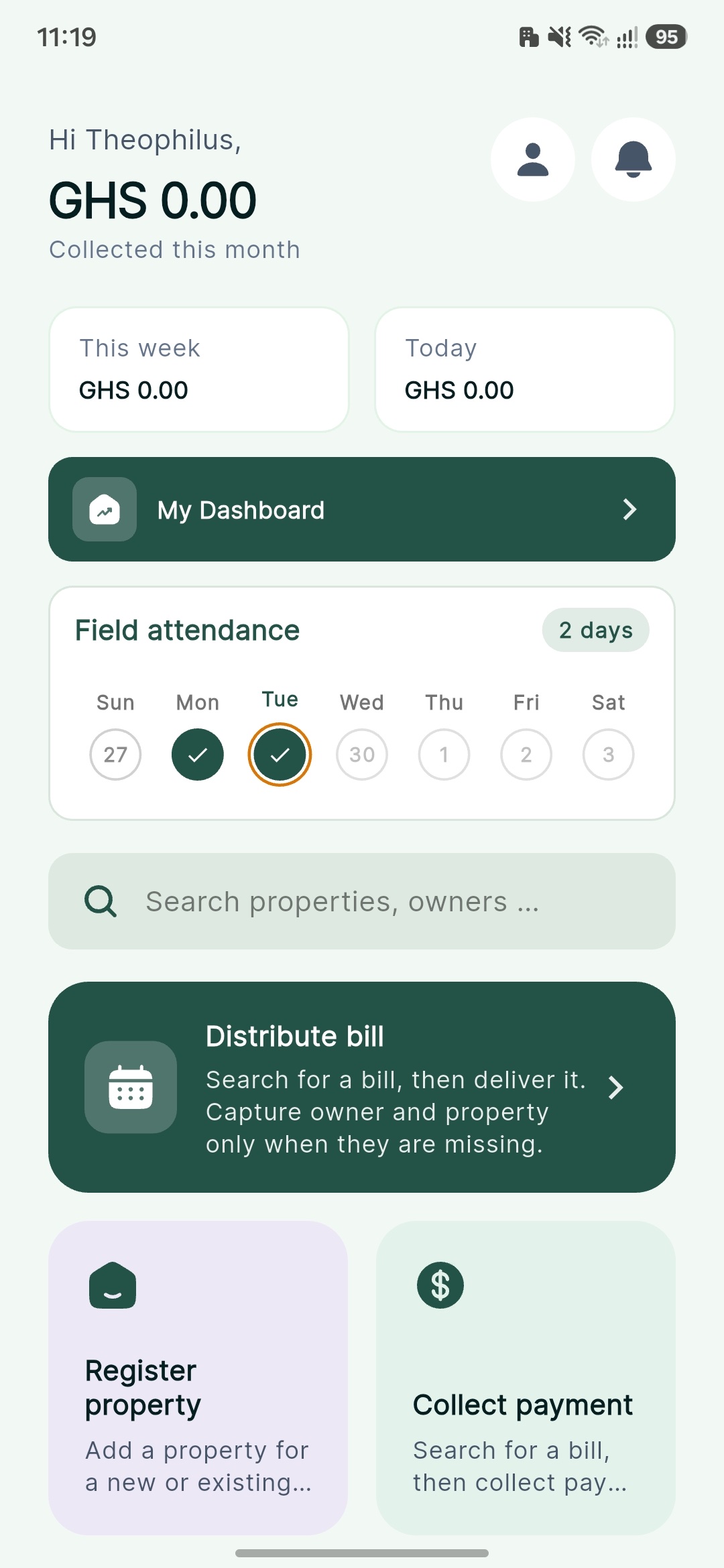
On the home screen
Link a new or existing owner, then enter address, map pin, zone, type, and class.
Search by owner name, phone, or email. Collect with MTN, AT, or Telecel MoMo.
Find bills not yet handed over and issue them while you are on site.
Register a business for a new or existing owner, the same way you add a building.
Create a new payer account when the person is not already on the register.
Notifications from the assembly land in your inbox. The bell shows unread count.
Install
This build is not on the Play Store. You install the file from this page.
Tap Download the app. The installer is about 64 MB. Use Wi-Fi if you can.
Android may ask you to allow this browser to install unknown apps. Turn that on, then return.
Open SmartRevenue.apk from Downloads. Tap Install, then Open.
Sign in
Ask your assembly if you do not have an agent number yet.
Use the number your assembly registered. Field agents and operations staff sign in this way.
The app records your position so today counts as a field check-in. Location is required.
A verification code is sent to that phone. Enter it to open your home screen.
Need an account?
Use the same phone number they saved. If install or sign-in fails, contact the revenue office that issued your account.